

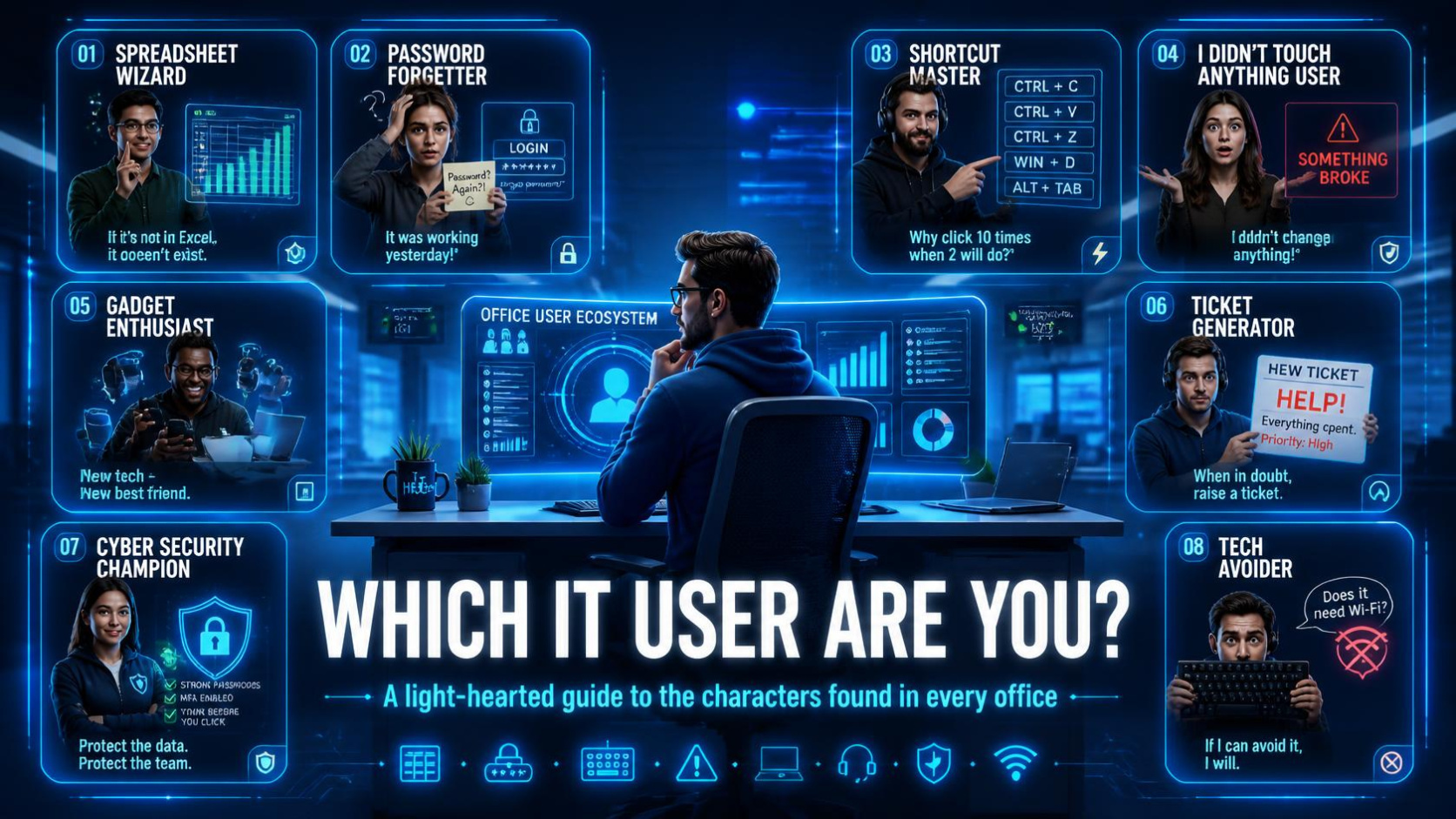
A Light-Hearted Guide to the Characters Found in Every Office
Let’s face it, every workplace has them.
Whether you’re in finance, manufacturing, professional services, retail, education, or healthcare, the modern workplace runs on technology. Yet despite using the same systems, hardware, and software, people interact with technology in wildly different ways.
After supporting businesses across the region for years, we’ve noticed some recurring personalities appearing in almost every organisation. You might recognise your colleagues. You may even recognise yourself.
So, which IT user are you?
The Spreadsheet Wizard
Catchphrase:
“I’ve built a spreadsheet for that.”
The Spreadsheet Wizard is capable of solving almost any business problem using Excel.
Need a sales forecast?…Spreadsheet.
Project management?…Spreadsheet.
Staff rota?…Spreadsheet.
A complete replacement for a CRM system?…Unfortunately, also a spreadsheet.
On one hand, these individuals are incredibly resourceful and often keep businesses moving. On the other, they occasionally build documents so complex that nobody else understands them.
The Spreadsheet Wizard’s greatest fear is retirement because no one knows how the company’s most important spreadsheet actually works.
Signs you may be a Spreadsheet Wizard:
- You know more Excel shortcuts than keyboard shortcuts in Teams.
- You’ve created formulas that span multiple screens.
- You’ve used colours, tabs, conditional formatting, and hidden worksheets to create a masterpiece.
- Someone has called you “the Excel guru”.
Capella’s Verdict:
A valuable asset, but perhaps it’s time to look at Power BI, Power Apps, or a dedicated business system.
The Password Forgetter
Catchphrase:
“I know it worked yesterday.”
The Password Forgetter has a complicated relationship with security.
They genuinely try their best but somehow manage to lock themselves out of accounts at the exact moment an urgent deadline approaches.
Every.
Single.
Time.
The Password Forgetter can often be identified by their collection of sticky notes or notebooks containing “secure” passwords written in increasingly confusing code.
Signs you may be a Password Forgetter:
- You have more password reset emails than marketing emails.
- You can’t remember which version of your password you’re currently using.
- Your browser knows your passwords better than you do.
- Microsoft Authenticator occasionally feels like your enemy.
Capella’s Verdict:
A password manager and some cybersecurity training could be life-changing.
The Shortcut Master
Catchphrase:
“Why are you using the mouse?”
The Shortcut Master operates at a level most of us can barely comprehend.
While everyone else is clicking through menus, they’re navigating applications using mysterious combinations of keyboard commands that seem physically impossible.
Watching them work is like watching a concert pianist.
Documents appear.
Emails are filed.
Windows move.
Tasks disappear.
Their hands never leave the keyboard.
Signs you may be a Shortcut Master:
- You know at least 20 keyboard shortcuts.
- Alt + Tab feels completely natural.
- You accidentally use shortcuts on other people’s computers.
- You become mildly irritated watching someone right-click for the tenth time.
Capella’s Verdict:
Keep doing what you’re doing. We admire your efficiency.
The “I Didn’t Touch Anything” User
Catchphrase:
“Honestly, I haven’t changed a thing.”
Every IT support team knows this character.
A system suddenly behaves differently.
A printer vanishes.
An application won’t launch.
A setting has mysteriously changed.
When asked what happened, the response is immediate:
“Nothing.”
After some investigation, it often turns out something was changed.
Usually several things.
Sometimes many things.
Signs you may be this user:
- Problems appear immediately after you’ve been working on something.
- Your first troubleshooting method is restarting repeatedly.
- Support engineers ask additional questions when you say nothing changed.
- You’ve accidentally clicked “Don’t show this again” more than once.
Capella’s Verdict:
No judgement. It happens to all of us.
The Gadget Enthusiast
Catchphrase:
“Have you seen the latest version?”
The Gadget Enthusiast loves technology.
New laptops.
New phones.
New software.
New AI tools.
If there’s a beta programme available, they’re already signed up.
They’re often the first person in the office experimenting with emerging technology and introducing useful tools to the wider team.
Occasionally they create additional support tickets in the process.
Signs you may be a Gadget Enthusiast:
- You watch technology launch events.
- You’ve tested AI tools before most colleagues had heard of them.
- You enjoy changing settings simply to see what happens.
- You volunteer to trial new systems.
Capella’s Verdict:
Innovation starts somewhere. Just maybe don’t install software without checking with IT first.
The Ticket Generator
Catchphrase:
“While I’ve got you…”
The Ticket Generator never has just one issue.
A simple request quickly evolves into a detailed discussion covering six unrelated technical challenges.
You start by helping with a mailbox query.
Ten minutes later you’re discussing printers, Wi-Fi, Teams, passwords, docking stations, and a monitor that stopped working in 2022.
Signs you may be a Ticket Generator:
- Every support call gets longer than expected.
- You remember additional issues partway through conversations.
- Your support history covers every category available.
- Support teams know your name immediately.
Capella’s Verdict:
We appreciate your thoroughness. We also appreciate separate tickets.
The Cyber Security Champion
Catchphrase:
“That looks suspicious.”
This person deserves recognition.
The Cyber Security Champion spots phishing emails before anyone else.
They question unusual requests.
They report suspicious activity.
They actively help protect their organisation from cyber threats.
Every business needs more people like this.
Signs you may be a Cyber Security Champion:
- You regularly report suspicious emails.
- You verify unusual requests.
- You use multi-factor authentication without complaining.
- You encourage colleagues to be security conscious.
Capella’s Verdict:
You’re helping protect the entire business.
The Tech Avoider
Catchphrase:
“Can somebody just do it for me?”
The Tech Avoider survived perfectly well before digital transformation and sees little reason things needed to become so complicated.
While everyone else is exploring new features, they have perfected the art of using just enough technology to get by.
Ironically, they are often among the most experienced and knowledgeable people in the organisation.
Signs you may be a Tech Avoider:
- You use only a fraction of the software available.
- Software updates make you nervous.
- You prefer proven processes over shiny new features.
- You occasionally miss the simplicity of paper files.
Capella’s Verdict:
A little training often goes a long way.
So, Which One Are You?
The truth is most of us aren’t just one type.
You might be a Spreadsheet Wizard with a touch of Password Forgetter.
A Shortcut Master who’s secretly a Gadget Enthusiast.
Or a Cyber Security Champion who occasionally becomes a Ticket Generator.
Technology is ultimately about people, and every workplace has its own unique mix of personalities. Understanding how your team works with technology can help improve productivity, strengthen security, and make daily life a little easier for everyone.
At Capella Computer Solutions, we work with all types of users every day, and that’s exactly what makes IT support interesting.
We’d love to know:
Which IT personality describes you best? And which one describes your colleagues?
Share your answers with us and see how many you recognise around your office.